
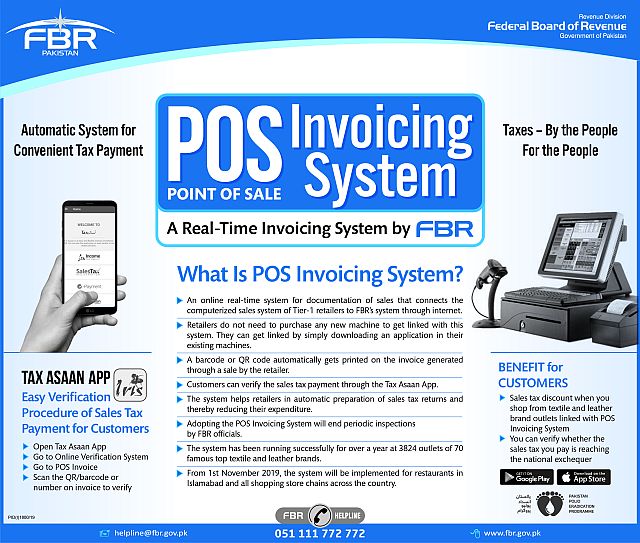
In recent years, the Federal Board of Revenue (FBR) has taken strong steps toward digitalizing the retail sector in Pakistan. One of the major initiatives is the compulsory integration of POS software with FBR for Tier-1 retailers. This process ensures transparency, real-time sales reporting, and accurate tax collection.
If you are a business owner—especially in retail—understanding how to integrate your POS software with FBR is essential. This guide explains the complete procedure, requirements, and benefits in simple, clear steps.
What Is FBR POS Integration?
FBR POS integration is the process where a retailer’s POS software connects directly with FBR servers. Each sale processed through the POS is reported in real-time to FBR via an electronic invoice system. The purpose is to curb tax evasion, improve documentation, and ensure fair competition among retailers.
Who Needs to Integrate POS Software With FBR?
FBR has defined Tier-1 retailers who MUST integrate their POS systems. These include:
- Retailers operating as franchises or chains
- Retailers with large retail outlets in shopping malls
- Retailers with electricity bills above the prescribed limit
- Wholesalers-cum-retailers
- Retailers dealing in furniture, electronics, jewelry, and large-scale consumer items
If your business falls under these categories, integrating your POS software is mandatory.
Step-by-Step Procedure for POS Software Integration With FBR
Step 1: NTN & Sales Tax Registration
Before any integration, the retailer must have:
- A valid National Tax Number (NTN)
- Sales Tax Registration (STRN)
If not already registered, apply through FBR’s IRIS Portal.
Step 2: Configure POS Software According to FBR Standards
Your POS software must comply with FBR’s technical requirements:
- Ability to generate electronically verifiable invoices
- Real-time communication with FBR’s servers
- Secure transmission of invoice data
- Proper user authentication
Most modern POS systems already come with FBR integration features.
Step 3: Enroll in FBR Taxpayer Facilitation Portal
Login to the FBR’s Taxpayer Facilitation Portal (TFA) using your IRIS credentials.
Here you must:
- Select “POS Integration”
- Register your retail outlets
- Register POS machines and terminals
This process assigns a unique POS ID to each terminal.
Step 4: Obtain FBR API Credentials
To connect your POS software with FBR servers, you must generate:
- API User ID
- API Password
- Integration Keys
These credentials allow your POS system to send invoice data securely to FBR.
Step 5: Activate the Software Integration
Your POS vendor or software team will:
- Enter the FBR API credentials into the POS system
- Test the connection with FBR’s sandbox environment
- Finally, connect the live environment for real-time reporting
A successful test ensures that every sale-going forward is reported to FBR automatically.
Step 6: Generate FBR-Compliant Invoices
Once integrated, your POS software must issue FBR-approved invoices, containing:
- FBR logo
- QR code
- POS ID
- Taxpayer details
- Real-time verification link
These invoices help ensure compliance for both the retailer and the customer.
Step 7: Confirm Integration Status With FBR
Login to your TFA portal and check:
- POS status
- Invoice reporting history
- Outlet compliance status
If everything is connected correctly, your outlet will appear as “Integrated” in FBR’s system.
Benefits of Using FBR-Integrated POS Software
Using integrated POS software brings several advantages:
✔ Avoidance of Heavy Penalties
Non-compliance may lead to fines and sealing of business premises.
✔ Accurate and Transparent Sales Reporting
Ensures authenticity in business records.
✔ Digital Efficiency
No manual submission of sales or tax records.
✔ Better Customer Trust
FBR-verified invoices build credibility.
✔ Automation of Tax Calculations
The system automatically applies and calculates sales tax.
Conclusion
Integrating POS software with FBR is no longer optional for Tier-1 retailers—it is a legal requirement and a major step toward digital transparency in Pakistan. The process is simple if handled correctly, and choosing the right POS system will save time, effort, and compliance issues.
Retailers using modern, FBR-compatible POS software not only avoid penalties but also enhance operational efficiency and customer trust.
If you need help with FBR registration, POS integration, or tax consultancy contact us,